本文详细讲解如何设置Aspose.Cells的授权与使用,阅读时间2分钟。
授权帮助类
1 using System; 2 using System.Collections.Generic; 3 using System.IO; 4 using System.Text; 5 6 namespace AsposeCellsDemo 7 { 8 public sealed class AsposeLicenseHelper 9 {10 public static void SetCellLicense()11 {12 var txtLicense = File.ReadAllText(AppDomain.CurrentDomain.BaseDirectory + "License.txt");13 var memoryStream = new MemoryStream(Encoding.UTF8.GetBytes(txtLicense));14 new Aspose.Cells.License().SetLicense(memoryStream);15 }16 }17 } 加载授权
1 using System; 2 using System.Collections.Generic; 3 using System.IO; 4 using System.Linq; 5 using System.Text; 6 using System.Threading.Tasks; 7 using System.Windows.Forms; 8 9 namespace AsposeCellsDemo10 {11 static class Program12 {13 /// <summary>14 /// The main entry point for the application.15 /// </summary>16 [STAThread]17 static void Main()18 {19 //设置授权20 AsposeLicenseHelper.SetCellLicense();21 22 Application.SetHighDpiMode(HighDpiMode.SystemAware);23 Application.EnableVisualStyles();24 Application.SetCompatibleTextRenderingDefault(false);25 Application.Run(new Form1());26 }27 }28 }简单使用
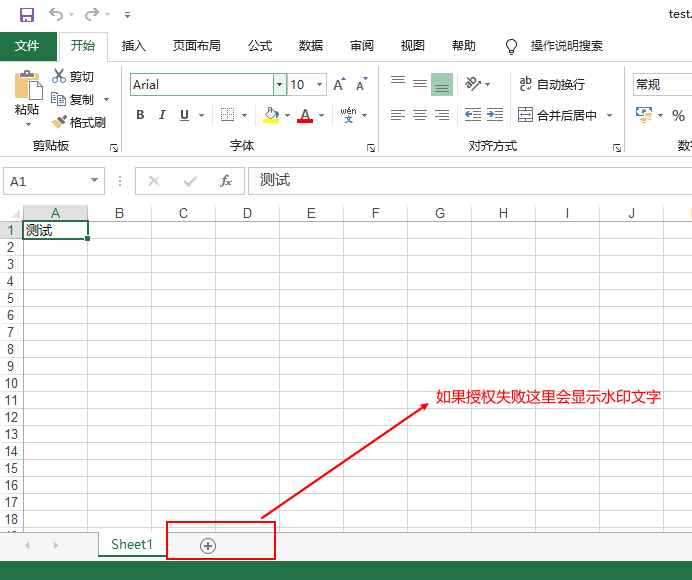
1 private void bExport_Click(object sender, EventArgs e)2 {3 var workbook = new Workbook();4 var sheet = workbook.Worksheets[0];5 sheet.Cells[0, 0].PutValue("测试");6 workbook.Save(AppDomain.CurrentDomain.BaseDirectory + "test.xlsx", SaveFormat.Xlsx);7 }输出效果

No comments:
Post a Comment